Bring your connected AI providers, choose a model, ask a question, or delegate a task with a click. Sierra handles coordination in the background, so you can focus on the research and writing.
Connect providers once. No coding, skills, or orchestration configuration required.
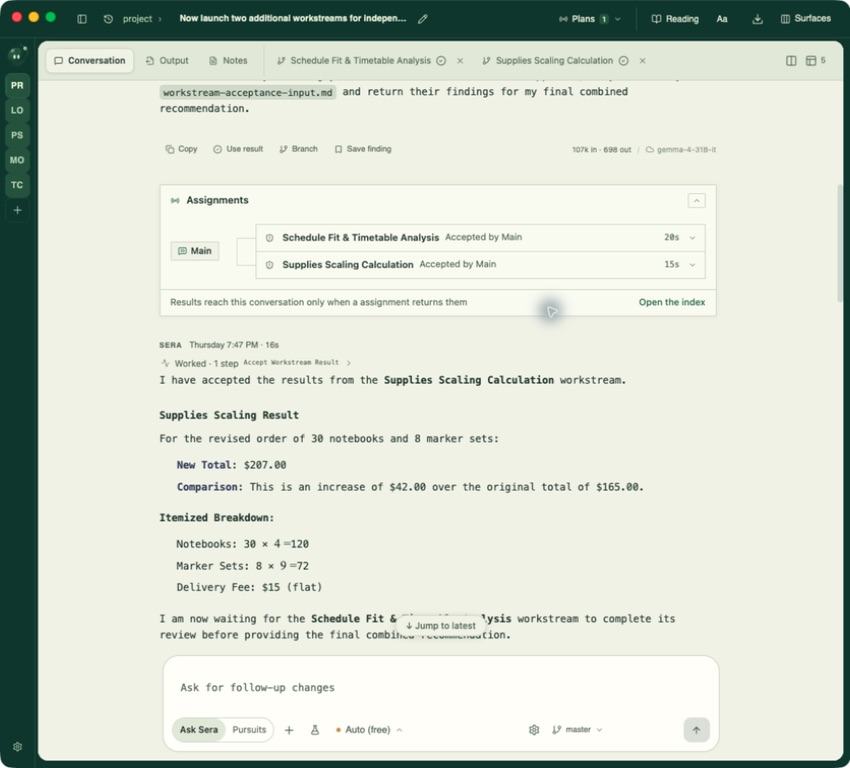
Inside Sera · two assignments, reviewed in the main conversationView full figure ↗
ONE PROJECT / MANY THREADSStay with the question while the work branches.↓
01 / THE SIERRA FLOW
Describe the work. Sierra handles the coordination.
You describe the outcome in plain language. Sierra keeps the connected work moving, then brings the useful result back to the project you are already looking at.
ONE PROJECT / FOUR BEATSReady when you are
01 / ASK
Start with the question in front of you.
“Help me turn these notes into a clear introduction” is enough to begin. No skills to install. No orchestration setup to learn.
A simple request becomes a shared project thread.
Main / Ask SierraPolymerase study
You
Help me turn these notes into a clear introduction.
Sierra · Claude
I’ll shape the opening around the question, the evidence, and the reader’s next question.
Project memory visibleMain thread
02 / DELEGATE
Divide the work. Keep the whole project in view.
Choose a model for each part of the job. Sierra keeps Introduction, Methods, and Results connected to Main while the work moves.
Different strengths. One project conversation.
Pursuit / manuscript check3 connected tasks
MAINPolymerase studyProject context
A
IntroductionShape the opening
Claude
C
MethodsAudit the protocol
Codex
G
ResultsCompare the findings
Gemini
Coordination in the backgroundConnected to Main
03 / INSPECT
See the source and the memory behind the result.
Review what Sierra used, which model shaped the response, and what still needs your judgment before it becomes part of the draft.
Useful work stays close to the evidence.
Inspect / source trailReview before use
⌁
Source noteenzyme-kinetics-review.pdf · p. 4
SOURCE
↺
Project memoryEarlier method note · visible
MEMORY
C
Model contributionCodex · comparison table
MODEL
○
Open questionDoes the comparison hold across conditions?
CHECK
Review the evidence before using the resultYour review
04 / RECAP
Bring the result back to Main.
Connected conversations return a concise summary, so you can pick up the whole project without hunting through tabs.
The project remembers where the work came from.
Main / recapPolymerase study
Sierra · Main
Introduction is ready for your edit. Methods has one source check open; Results has a comparison to review.
Summary from Claude, Codex + Gemini
PROJECT RECAP2 checks open
Introduction connected
Methods source check
Results comparison
Ready for the next decisionBack in Main
Illustrative product story — play the walkthrough or explore each step at your own pace.
ResearchWritingEditingModel choiceProject memoryTraceable work
02 / THE WORKSPACE
Divide the work. Keep the whole project in view.
Keep connected conversations alongside Main. Open Introduction, Methods, or Results, then bring their summaries back when you need the project’s full shape.
EXPLORE ON YOUR OWN
Open a connected conversation to inspect the workspace detail.
Sierra
PROJECTPolymerase study / working draft
Illustrative demo
Choose a connected conversation to inspect how the project stays together.
03 / CHOOSE THE MODEL
Bring your AI models together in one conversation.
Use supported providers in the same project when the work calls for a different perspective. The conversation stays attached to your work as the model changes.
ONE THREAD / DIFFERENT VOICES
The right model for the next question can be part of the same conversation.
Sierra makes the choice visible, so you can see which model shaped a response and keep your review grounded in the project.
01
C
Codex
Build a careful plan or inspect a technical step.
Example role · planning02
A
Claude
Shape a paragraph, argument, or editorial pass.
Example role · writing03
G
Gemini
Offer another lens on comparison or synthesis.
Example role · comparison
Same project contextDifferent model choice
04 / TWO WAYS TO MOVE
Ask a question. Or set a pursuit in motion.
Stay conversational when you need a clear answer. Switch to Pursuits when a goal benefits from a defined plan and delegated work.
ASK SIERRA / A FOCUSED EXCHANGE
Ask the question that is on your mind.
Use the same project conversation for a quick explanation, a rewrite, or the next decision in your work.
↳ One question in, one considered reply back.
You
Can you tighten the claim in this paragraph?
Sierra · Claude
I can suggest a revision and show which source supports it.
Project context attached ✓
Conceptual interaction — switching modes changes the shape of the work; it does not start a live run here.
05 / MEMORY + SOURCES
Pick up where you left off. See what Sierra remembers.
Project memory should be visible enough to trust. Sierra keeps the working context close, makes imported material inspectable, and helps you pick up where you stopped.
PROJECT MEMORYVISIBLE
A project has a working memory.
Review the material Sierra can use before you ask it to move the work forward.
⌁project-memory.mdUpdated from this workspace↗
≡source-map.csvReferences and open checks↗
↥claude-session.mdImported session · reviewable↗
✳ Bring in Claude or Codex sessions, or paste earlier work, then review it before carrying it forward.
TRACEABLE WORKFOLLOW THE THREAD
Follow every result back to the work behind it.
Keep outputs, source notes, and open questions close enough to inspect while you write and edit.
Source noteenzyme-kinetics-review.pdf · p. 4
SOURCE
Draft paragraphIntroduction / paragraph 03
OUTPUT
Open questionDoes the comparison hold across conditions?
CHECK
✳ Illustrative records show the intended shape of provenance.
06 / MADE FOR THE WORK BEHIND THE WORK
Less hunting for the thread. More making the argument.
Sierra is shaped for people who research, write, revise, and need to know how a conclusion took form.
ResearchWritingEditing
07 / BEFORE LAUNCH
Questions worth asking early.
The product is taking shape. These answers stay precise while the launch details are being finalized.
What does provider agnostic mean here?+
It means a project can work with supported models from more than one provider, with the model choice visible in the conversation. Availability and behavior will depend on the integrations Sierra supports at launch.
What is the difference between Ask Sierra and Pursuits?+
Ask Sierra is a focused exchange: you ask, Sierra responds. Pursuits gives a goal a plan and lets you delegate parts of the work to selected agents, then bring the results back to the main project conversation.
Can I bring work from another AI workspace?+
The intended continuity path is to bring in Claude or Codex sessions, or paste earlier work from the project directory. The supported formats and review flow will be published before launch.
When can I try Sierra?+
Launch details are coming soon. The workspace above is an illustrative preview of the product direction, not an active sign-up or download flow.
Launch details coming soon
Keep the work moving from one clear place.
Explore the workspace story now. Sierra’s release path will be shared when the product is ready for a real project.